|
|
|
TME
- Ethernet Temperature Alarm Unit
|
|
Description |
|
|
|
|
|
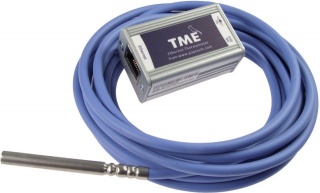
The
TME web thermometer is an Ethernet based single channel temperature
alarm unit configured using a built-in web server. If the temperature
exceeds specified high/low thresholds, an e-mail alert is sent.
Measurement range from 55°C to +125°C. A direct text
output of the temperature value in °C (ASCII) also provided.
Also supports TCP, UDP, HTTP (WEB), SMTP (e-mail), SOAP, Modbus TCP
and SNMP protocols. The FREE Wix chart/data logging software is also available.
Need
Humidity Too - see TH2E >>
|
|
Features |
|

TME
TME-POE
- Power Over Ethernet Version

TME-POE
|
User
Manual >>
Config
software >>
|
|
Web
Browser |
|
TME
is a simple temperature sensor with Ethernet interface. It measures
temperatures ranging from -55°C to +125°C. Measured values
can be read in several ways including internal WEB pages. The
communication is realized via various TCP/IP protocols. Thanks to
this it is possible to choose a method suitable for particular
application. The temperature is sent in a simple ASCII format
directly in degrees Celsius; there is no need of any additional
conversion. It also enables communication with SNMP protocol (UDP) or
sending an e-mail in case any of the pre-set limits is exceeded.
You
can easily embed the temperature from TME to your WEB site using
http GET. Measured temperature is also available in XML file or it
can be sent as an http POST in XML format for further processing in a
WEB service. (All temperature acquisition methods are on page 6.)
TME
is configurable via WEB interface. TME is powered from an external
PSU 5V (TME) or directly from ethernet network according to
IEEE802.3af standard (TME PoE)

|
|
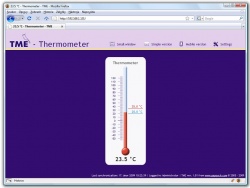
WEB
page
It
is possible to easy monitor the measured temperature and also to
configure TME over the Intranet interface. The pages are secured by
means of user name and password. It is possible to setup a separate
password for the configuration and another one for the display of
current values.
Temperature
is displayed as text or as a graphical thermometer.
XML
file
It
is also possible to import all the values from TME in the XML file
format. This format is easy to process by the application or to read
by the web service.
|
 |
|
|
WAP
page for PDA of mobile phone
TME
contains a simple WAP page with measured data. It is possible to
open this page in a mobile phone, PDA or another mobile device. Thus
the current status of the device can be viewed whenever needed.
Inserting
the current values into the WEB sites (HTTP GET)
AD4ETH
enables you to periodically call a script (for example PHP or ASP)
on a selected WEB server and to hand the measured values and other
parameters over to the server in the form of HTTP GET parameter. Thus
you can easily include the currently measured values directly into
your WEB site.
|

|
|
|
Current
values handing-over to the WEB service (HTTP POST, SOAP)
TME
is also able to periodically send the measured data as HTTP POST in
the format of XML SOAP (Simple Object Access Protocol). This way is
ideal for further processing of the measured values by the WEB
service waiting in a server on the Internet or Intranet. This data in
the XML format can be easily processed, e.g. in the.NET or PHP
environment there is no need to program any communication
protocol, etc. The only thing than needs to be done is to process the
delivered XML file. |
 |
SNMP
protocol
The
SNMP protocol is used in large companies for the centralized
administration and monitoring of all hardware and technologies. TME
is able to communicate via this protocol and, according to the setup,
It sends SNMP traps when the pre-set critical limits are exceeded. It
is also able to periodically send traps with current values.
SNMP
MIB Tables >>
E-mail
TME
is able to inform the user via email that the critical limits have
been exceeded. (Thanks to services provided by operators it is
possible to forward the e-mail easily to a mobile phone as an SMS message.)

TCP
or UDP protocol
TME
is also able to operate as the TCP client or TCP server or to
communicate via UDP. An ASCII protocol is used by TME in these ways
of communication. This way of communication is similar to the serial
link communication.
MODBUS
TCP protocol
TME
is also able to communicate via the standard industry protocol of
MODBUS TCP use by popular SCADA packages such as DAQFactory
|
|
|
Development
Software
TME
DLL library. (Including functional sample and source code for C#
.NET.) Download
>>
A
demo program can be downloaded free of charge, showing how the
temperature measurement works. You can also download free of charge
its complete commented source code for Delphi 7. Download
>>
Free
sample application for .NET, to be used to collect data from
temperature sensors and presenting them as graphs, WEB service and
RSS feed. Download
>>
|
 |
|
|
|
|
Software |
|
|
|
|
|
|
|
FREE
- Wix

Wix
Download >> |
FREE
Powerful datalogging, charting and alarming sftware;
|
|
|
|
Optional
- DAQFactory

DAQFAC-START
Download
Trial >>
|
DaqFactory-Starter
is a new new cut-down version of the popular DAQFactory
data acquisition and control package called DAQFactory Starter.
DAQFactory Starter offers all the basic features of an HMI / SCADA
software tool including data acquisition, data logging, three user
definable screens with 44 screen components, powerful graphing and
trending, plus Email and FTP out for a wide range of devices. Fully
compatible with the DigiRail range.
Ready-to
Run MODBUS Scanning Tool
Included
with DAQFactory, the QuickMod Pro Modbus scanning tool allows you to
quickly monitor and control a Modbus device connected over ModbusRTU
on RS-232 / RS-422 / RS-485, ModbusRTU over Ethernet, or ModbusTCP.
You can convert your data into engineering units, log it, and display
a historical trend graph.
|
|
|
ProfiLab-Expert
- graphical
programming software package for data acquisition and control applications
|
 |
|
|
Phone
+44(0)115 925 8412 | Fax +44(0)115 925 9757 |